PowerColor 7900XTX Red Devil: Further down the Spiral
Hot Spot issues are back. Let’s fix them!
Issue description
Almost a year ago I described the issues I was having with high Hot Spot temperatures on my 7900XTX plus my experiences wit PowerColor RMA in this post: PowerColor 7900XTX Red Devil: issues with stock TIM application. I would suggest checking that page first before reading any further.
Initially I was pretty happy with the temps on my card after the RMA service. HotSpot was staying below 100 °C, other temps were also reasonable. Sadly that did not last long. After couple of months I spotted Hot Spot at around 105 °C, that made me re-run all the tests I did previously to see what was happening and then I realized the original issue was back. RMA “fix” helped for couple months, but after that time, issue poped again. I guess paying 1200 EUR for a card and then RMA process is not enough those days to get a properly working product. At that point I knew I have to void my warranty and try to fix the issue myself.
First couple of screws (one of them with warranty sticker) went out smoothly and then the fun began. I could not unscrew 2 screws holding radiator to the PCB, those were turning in place. After trying some unconventional methods I finally somehow managed to unscrew those and I was finally able to remove the heatsink. What I saw really shocked me.
The radiator standoffs with sockets for screws were ripped apart from the radiator itself! This damage was not caused by me, it was done by PowerColor RMA service. See the picture below, the 2 standoffs should be raised above the heatsink level, instead, those sunk into radiator, when screws stopped holding them back. That was the reason why I could not unscrew the screws!
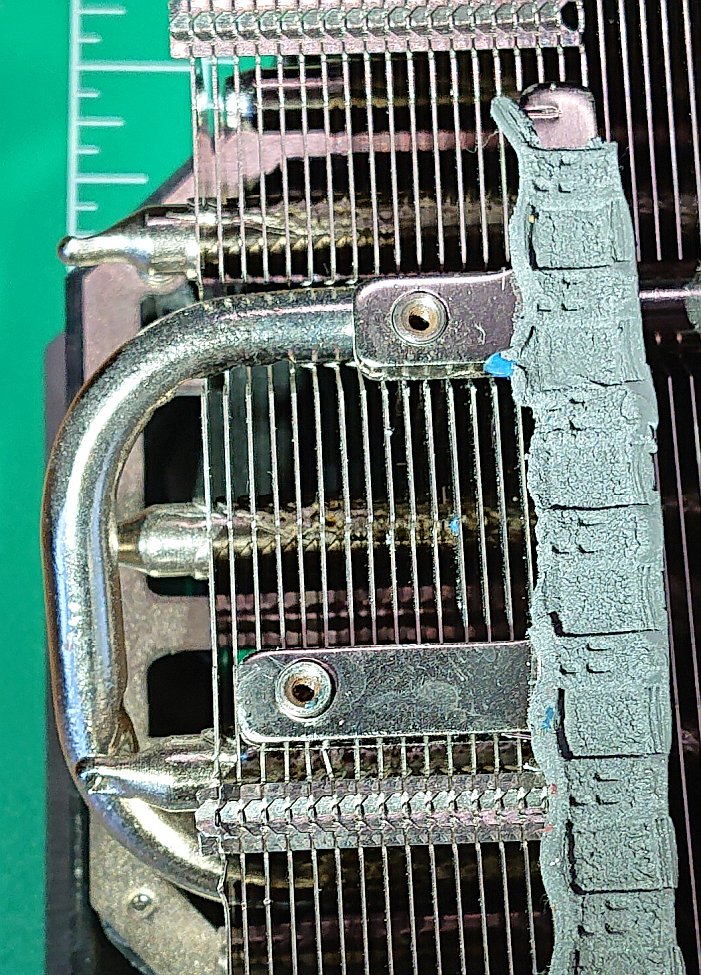
Of course at that point in time I already lost the warranty and could not complain to PowerColor, but seriously, I will stay as far as I can from their products and warranty service in the future!
That is how the paste looked when I opened the card. It looks like some low viscosity stuff. Famous pump out effect?
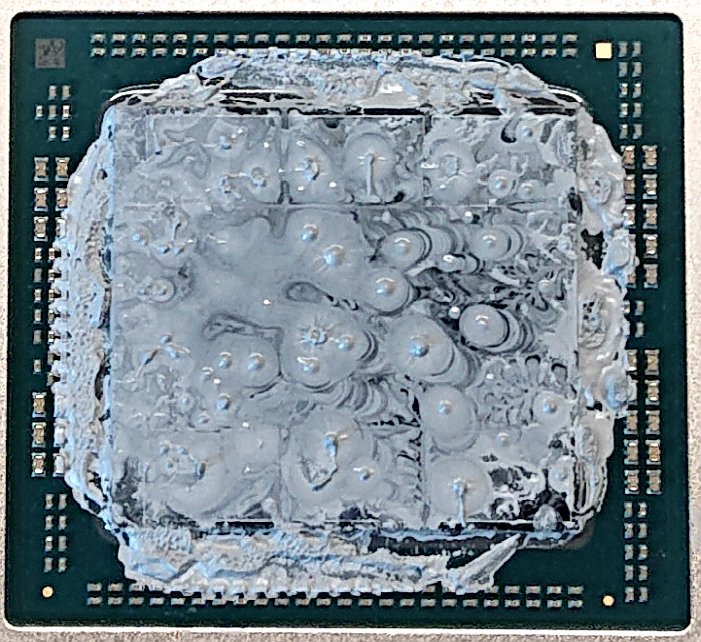
Anyway I have repasted the core with Alphacool Apex thermal paste (high viscosity paste) and since I saw the thermal pads on RAM and VRMs are already starting to show some wear I decided to replace those as well. Measured those, 2 VRM strips are 2mm thick and easy to replace, however thermal pads on RAM… Oh man!
It took me couple of hours to realize that thermal pads on RAM chips on this card are neither 1mm nor 1.5mm thick. I mounted the cooler couple of times with different 1mm pads on the RAMs, but my memory junction temps (from what I understand this is something like hottest spot on one of the RAM chips) were always way higher (high 90s, 100s) than on stock pads (80s). I tried 1.5mm pads as well, memory junction temps were great (low 80s), but core and especially hot spot temps were atrocious (100+) and throttling, clearly pointing that 1.5mm pads are too high, so the heatsink does not have good contact with core.
In the end I settled on some high quality 1mm pads (Gelid GP-Ultimate). With those, even with imperfect contact, my memory junction stays under 100 °C, although temps are still higher than on stock pads. Luckily for me, seems that the broken standoffs on the radiator do not affect the temps too much (I am running the card without 2 screws).
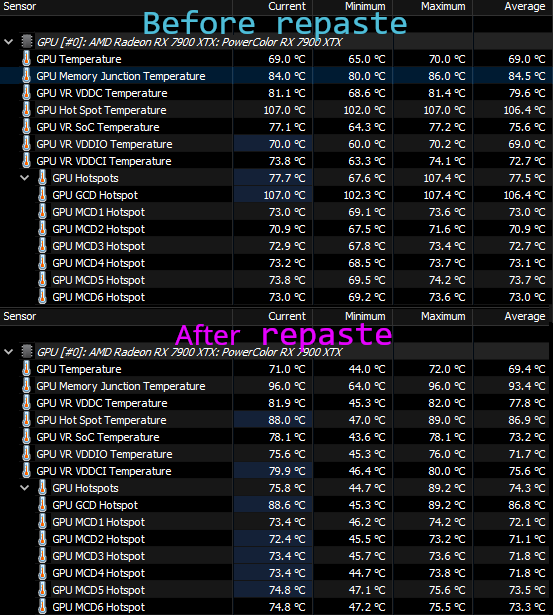
There is still room for improvement, but for now the card is put together as it is. I want to make sure I won’t get that performance degradation from Alphacool Apex TIM as I got from factory one (so far it is good, card been like this for couple of months already).
I still need to improve memory temps somehow. Maybe I will just use thermal putty instead of thermal pads on the RAMs or I will find 1.2 mm thermal pads somewhere. :wq::
Measurements
Card was set to Silent BIOS in both cases (before and after repaste). All parameters were logged using GPU-Z to CSV file and later analyzed.
Test setup
- Ryzen 9 3900X
- ASRock X570 Taichi
- GSkill F4-3200C14D-32GTZKW (2x16GB B-Die)
- Samsung 980Pro 1TB (system)
- PowerColor 7900XTX Red Devil
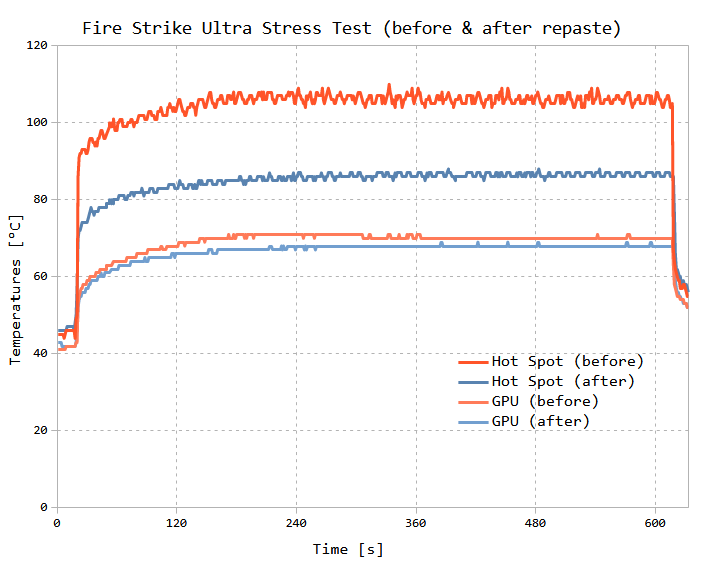
FireStrike Ultra Stress Test
| Parameter (average value) | before repaste | after repaste |
|---|---|---|
| GPU temp | 69.8 °C | 66.9 °C |
| Hot Spot | 105.6 °C | 85.1 °C |
| GPU clock | 2446 MHz | 2432 MHz |
| Fan speed | 1429 rpm | 1201 rpm |
Time Spy Extreme Stress Test
| Parameter (average value) | before repaste | after repaste |
|---|---|---|
| GPU temp | 69.3 °C | 68.7 °C |
| Hot Spot | 103.6 °C | 85.5 °C |
| GPU clock | 2435 MHz | 2407 MHz |
| Fan speed | 1395 rpm | 1147 rpm |
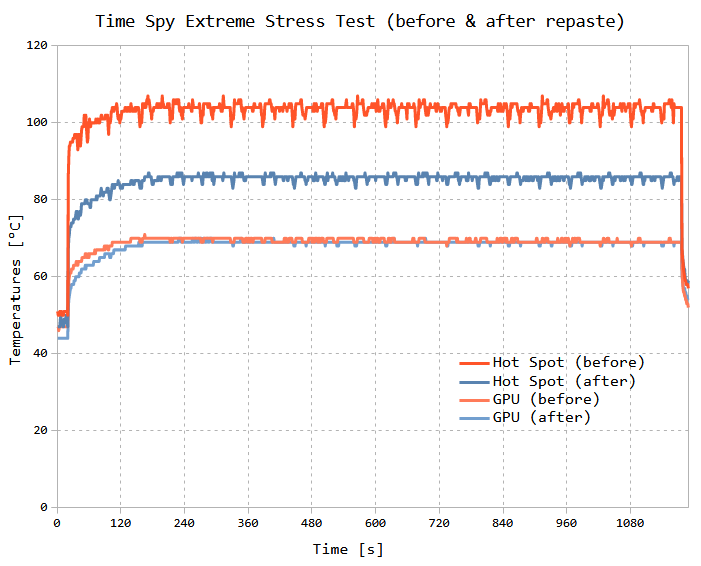
I don’t get why average clocks are slightly lower after repaste, performance stayed the same. It might be measurement error, might be a mistake in my spreadsheet formulas (although I double checked those!). But my best guess is that since GPU-Z captures values every second, it might not be very accurate. Still the measurements clearly show the improvement from repasting.
Conclusions
If you want something done well, do it yourself.
Don’t buy GPUs from PowerColor and if you have to, avoid their RMA service.